Conversion Modeling in GA4 After Consent Gaps
Google's modeling fills consent gaps, but only if you configure it correctly.

- Written by
- Tomás Rendón-Ybarra
- Published
- September 23, 2026
- Reading time
- 9 min read
- Sources cited
- 3 sources ↓
What this covers
- The regulatory and policy changes that made conversion modeling a necessity rather than a feature
- Basic versus Advanced Consent Mode: the architectural choice that determines whether modeling activates at all
- The eligibility thresholds that determine whether modeling activates for a given property
- Structural limitations of GA4 modeling that affect how much you can trust the numbers
Only about 31% of users accept tracking cookies on average. Most of the traffic hitting a website has gone dark to standard GA4 measurement. Conversion modeling exists to close that gap. Understanding how it works, what it needs to switch on, and where it still falls short is now basic operating knowledge for anyone running paid media or reporting on it.
The gap isn't a consent-banner problem alone. Safari caps cookie life at one to seven days. Firefox blocks third-party cookies entirely. Ad blockers are widespread across browsers. Consent rejection stacks on top of that problem, and browser-based pixel tracking now catches somewhere between 32% and 45% of actual conversions, down from north of 85% as recently as 2022. In the EU, 30% to 60% of visitors click "reject," so a GA4 report in some markets describes a fraction of what actually happened on the site, and treating that fraction as the whole picture is the mistake this piece is written to correct.
The regulatory and policy changes that made conversion modeling a necessity rather than a feature
None of this happened by accident. Consent Mode v2 became mandatory for EEA and UK advertisers on March 6, 2024, after the EU named Google a gatekeeper under the Digital Markets Act. That designation forced a rebuild of what Consent Mode actually asks users for.
Version 1 ran on two parameters: analytics_storage and ad_storage. Version 2 added two more: ad_user_data, which governs permission to send user data to Google for advertising, and ad_personalization, which governs permission for ad personalization specifically. A fifth flag, ads_data_redaction, controls whether Google strips identifying details from an ad click even when some consent has been granted. Four parameters now gate different flows of data rather than acting as one blanket switch.
The consent framework producing this shift is IAB TCF: it moved from v2.2 to v2.3, and that migration is what changed what publishers and Google could rely on. IAB TCF v2.3 replaced v2.2, and publishers and CMP vendors had until February 28, 2026 to migrate; Google has accepted v2.3 signals since October 2025. Then came the bigger change: on June 15, 2026, Google retired Google Signals as a control over how data flows from GA4 into Google Ads. ad_storage in Consent Mode is now the single gate on that pipe. One flag decides whether advertising data moves from GA4 into a linked Ads account.
Basic versus Advanced Consent Mode: the architectural choice that determines whether modeling activates at all
A property makes one binary choice, and it decides everything downstream: Basic Consent Mode or Advanced Consent Mode. Get this wrong and no amount of downstream tuning fixes it.
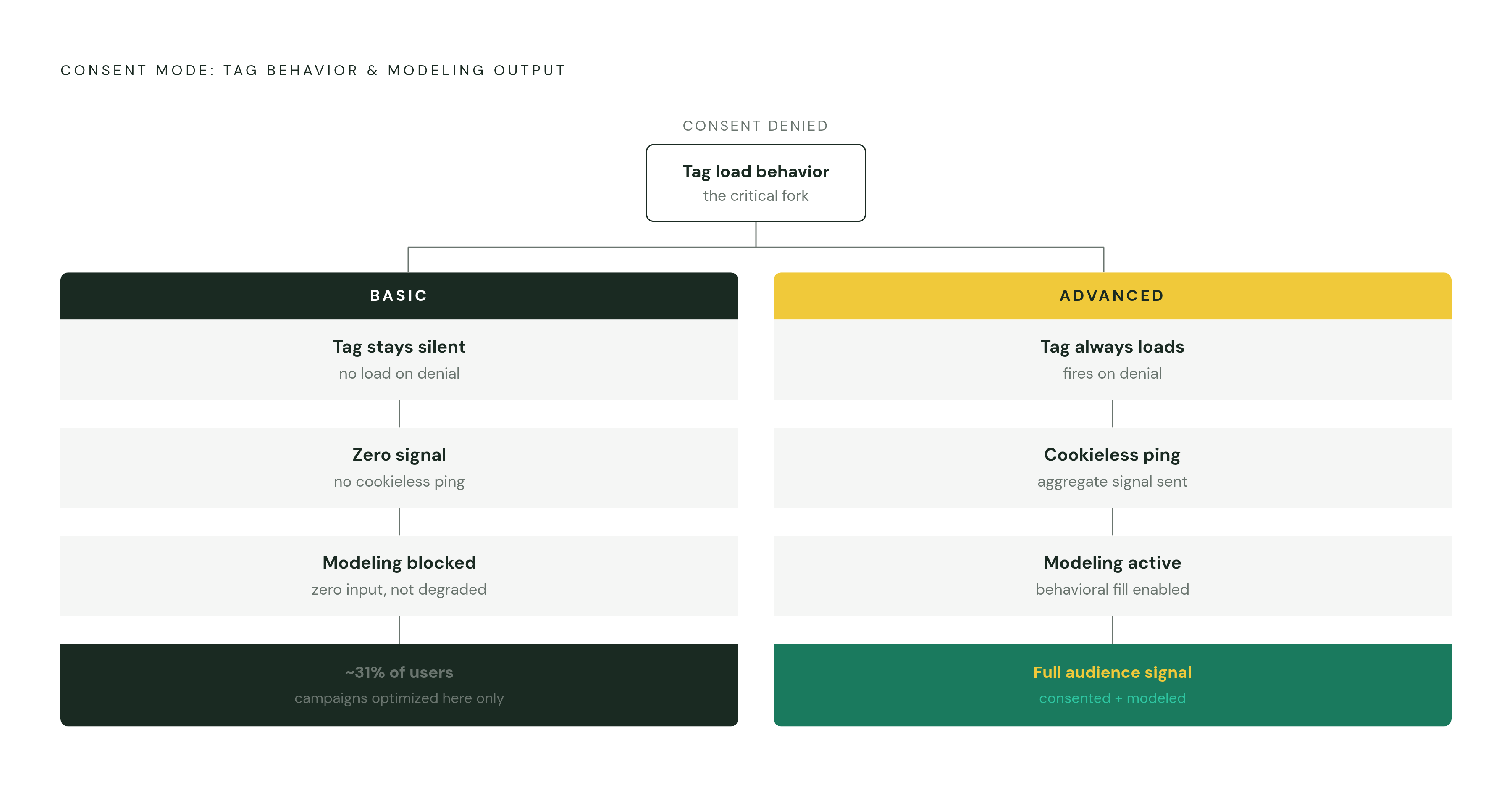
Basic Consent Mode is the strict version. If a user hasn't consented, or has actively refused, Google's tags simply don't load. No data reaches Google, no signal, no modeling input. It's the cleanest option from a privacy standpoint, but a property running Basic is optimizing campaigns using only the roughly 31% of users who click "accept." The other 69% are absent data, not degraded data. They're absent data. Zero. Anyone running Basic and wondering why their modeled conversions look thin has already answered their own question.
Advanced Consent Mode works differently, and it's the one worth running. Tags load right away regardless of consent status, and behavior adjusts based on what the user decided. When someone denies cookies, the tag doesn't go dark, it sends a cookieless ping instead. That distinction, tag loads versus tag stays silent, is the entire ballgame. Without Advanced Consent Mode, there's nothing for GA4's modeling system to model from. Basic Consent Mode and behavioral modeling are, in effect, mutually exclusive.
How GA4 constructs modeled conversions from cookieless pings
What's actually inside one of these cookieless pings? When a user denies analytics_storage, GA4 doesn't set an analytics cookie, but under Advanced Consent Mode it still sends a stripped-down signal back to Google containing a timestamp, a randomly generated session ID not tied to the person, the page path, device and browser type, country, traffic source data pulled from UTM parameters and referrers, and whatever conversion event fired, a purchase, a form submission, whatever the site tracks.
What's missing matters just as much. No user ID. No client ID. No persistent identifier that could stitch one visit to another. No cross-session tracking, no demographic data, no personalization signal. The ping stays anonymous at the individual level, but it carries enough structure at the aggregate level that Google's modeling system can take thousands of these pings, correlate them against patterns from consented users on the same site, and estimate how many conversions probably happened among the people who said no to cookies.
The eligibility thresholds that determine whether modeling activates for a given property
Modeling doesn't switch on just because Advanced Consent Mode is installed. GA4 sets hard thresholds, and a property has to clear all of them before behavioral modeling activates.
Consent Mode has to run across every page and every app screen, and the tag has to load before the consent dialog even appears, which is what "Advanced implementation" means in practice: Google's tags load in all cases, consented or not. On top of that, the property needs at least 1,000 events per day with analytics_storage set to denied for at least 7 days, and at least 1,000 daily users sending events with analytics_storage set to granted on at least 7 of the trailing 28 days.
For Google Ads conversion modeling specifically, the bar requires at least 700 ad clicks over a 7-day window, a full 7 days of data collection, and a consent rate of 20% or higher to keep the model's accuracy usable. Clearing every threshold still doesn't guarantee the lights turn on immediately. Training and activating the models can take extra time past that 7-day window, so a property can technically qualify and still not see modeled numbers for a stretch afterward.
What modeling recovers, and the gap between the headline figure and reported practitioner experience
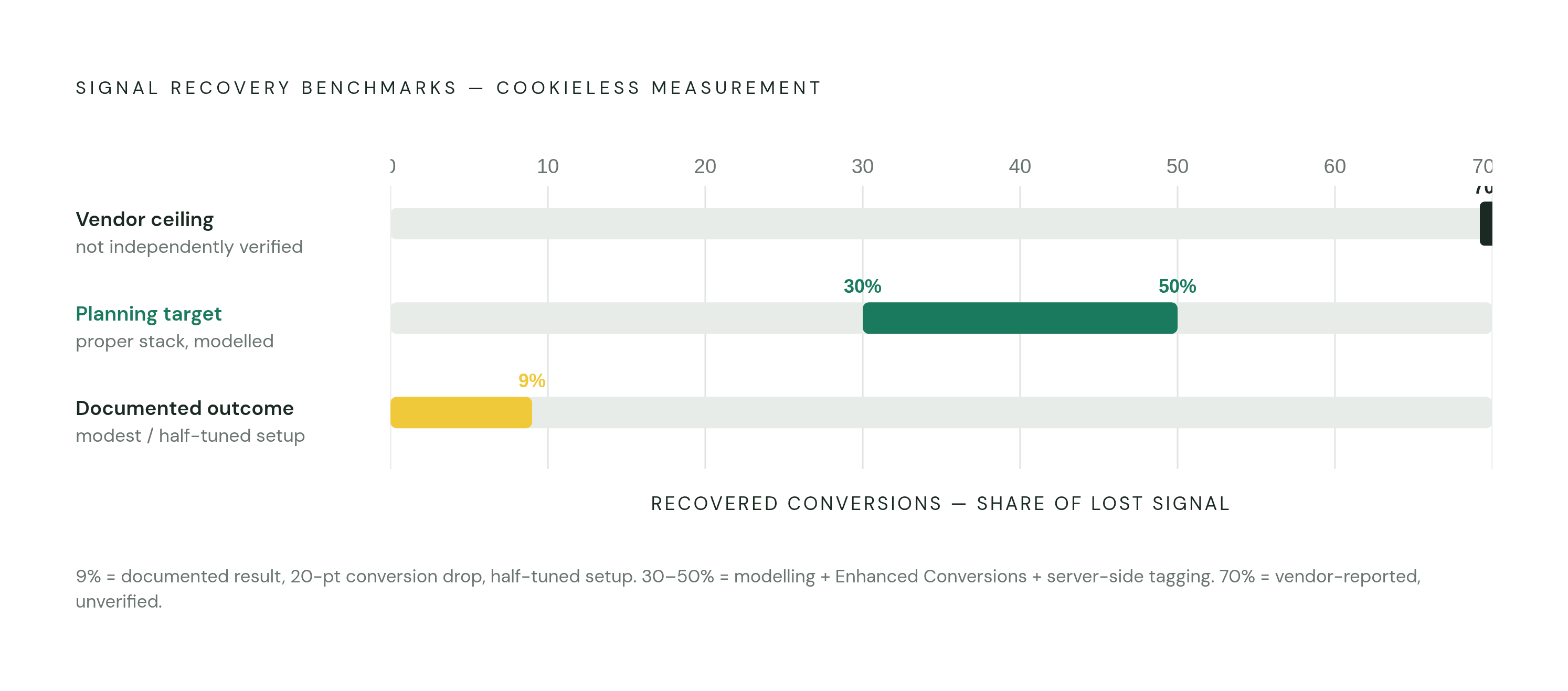
The number that circulates most in vendor decks is that behavioral modeling can recover up to 70% of conversion attribution. Treat that number with suspicion: it's a vendor and practitioner-reported figure, not one Google has independently published or verified, and it functions more as a ceiling than an expectation.
Real-world reporting tells a narrower story. One documented case showed conversion counts drop 20% after a site started enforcing cookie consent properly, with GA4's consent mode clawing back only 9 of those percentage points. Nine, not seventy. The documented recovery range is 30% to 50% of lost conversions once you zoom out to the full toolkit, conversion modeling plus Enhanced Conversions plus server-side tagging working together.
These figures don't actually contradict each other. They describe different sites, different traffic volumes, different consent rates, and wildly different implementation quality. Read it this way: 9% is what a modest, half-tuned setup recovers, 70% is close to a best-case ceiling under near-perfect conditions that few sites meet, and 30% to 50% is what a properly built stack using multiple techniques together tends to land on. Plan around the middle range.
Structural limitations of GA4 modeling that affect how much you can trust the numbers
Once modeling switches on, GA4 blends observed data and modeled data in the same report, with no column, no asterisk, no per-row flag telling you which is which, so a conversion count of 100 could be 100 observed events or 60 observed and 40 modeled with the interface showing both cases identically. That's where trust in the number actually breaks down. A conversion count of 100 could be 100 observed events, or 60 observed and 40 modeled, and the interface shows both cases identically.
The only clue available in the standard interface is a single report-level note. Hover over the data-quality icon and it reads, "Analytics is estimating data that's missing due to factors such as cookie consent." That's the entire disclosure. No breakdown by channel, by day, or by campaign.
It gets more consequential for anyone pulling data into BigQuery, because modeled conversions never make the trip. They appear in the GA4 reporting interface but are not exported to BigQuery, full stop. To make it concrete: if a large share of visitors decline consent, GA4's own report might show 100 total conversions combining observed and modeled figures. Pulling the same period from BigQuery shows 60. Just the observed 60. The higher the consent rejection rate in a given region, the wider that gap gets, and regions under strict consent regimes show the largest GA4-to-BigQuery discrepancies. Any attribution model, dashboard, or analysis built downstream of the BigQuery export runs on observed-only numbers, not the blended figure a stakeholder is looking at in the GA4 UI at the same moment.
And if the CMP itself signals consent status to GA4 incorrectly, the modeling doesn't refuse to run. It fills in a larger gap anyway, with less accuracy, because the training signal it's learning from was already corrupted at the source.
Matching the right data source to the right decision
Observed data and modeled data aren't competing versions of the truth. They answer different questions, and the mistake most teams make is grabbing whichever number is on screen and using it for a decision it was never built to support.
For quick, directional reads, and for in-platform optimization generally, GA4's blended reporting is the right tool. The modeled figures exist specifically to feed Smart Bidding and campaign-level decisions inside Google's own ecosystem, so using them there is using them as designed.
For attribution modeling, or any analysis happening outside GA4's interface, BigQuery is the correct source. Unsampled event data with every parameter intact avoids stacking more uncertainty on top of an estimate that's already an estimate.
For Smart Bidding specifically, resist the instinct to "clean up" the input by feeding it raw observed-only data instead of GA4's modeled signal. Google's bidding algorithms are built to consume the modeled numbers. Pulling that signal away and replacing it with a stripped-down observed-only feed can make automated bidding perform worse, not better, which is the opposite of what most teams intend when they make that swap.
Complementary techniques that strengthen what modeling alone cannot recover
Modeling alone doesn't close the whole gap, and treating it as the whole solution is where a lot of setups stall out. Enhanced Conversions is a companion technique. It hashes a first-party identifier, an email address, a phone number, and sends that hashed value along with the conversion event, letting Google match it to a logged-in Google user even if the cookie that would normally carry that signal was blocked or already deleted.
That directly answers the issue of short cookie lifespans that Safari created. If a cookie only lives one to seven days and someone clicks an ad Monday but doesn't buy until Saturday, the cookie is gone by the time the sale happens. Enhanced Conversions can still tie that sale back to the original click using the email address entered at checkout. Most advertisers see a 5% to 25% conversion uplift once it's implemented properly.
Setup runs three possible paths. Automatic Collection takes roughly 10 minutes and covers most standard setups. Manual Code gives precise control for custom checkout flows that don't fit a template. Google Tag Manager takes 30 to 45 minutes and suits sites with more complex tracking already in place. Once it's live, the health check lives in Google Ads under Goals, then Conversions, then the Diagnostics tab: look for 50% or more of conversions marked as enhanced. Anything under 30% means the implementation needs fixing, not more patience.
Methodology & sources
- Google Ads Tracking After Consent Mode V2: The Fix That Works (2026)
Provided the 31% average cookie acceptance rate, the 30–60% EU rejection range, the 20% minimum consent rate for Google Ads modeling, the 30–50% recovery range for the full toolkit, and the 5–25% Enhanced Conversions uplift figure.
- How GA4 Consent Mode Restores Missing Data
Provided the 70% recovery ceiling figure and the 9% real-world recovery example used to contrast vendor claims against practitioner experience.
- https://support.google.com/analytics/answer/11161109?hl=en
Provided the official GA4 eligibility thresholds for behavioral modeling: 1,000 daily denied events for 7 days and 1,000 daily consented users on 7 of 28 trailing days.