Warehouse-Native Analytics With dbt and BigQuery Event Tables
How dbt and BigQuery transform raw GA4 events into actionable data.

- Written by
- Lena Vogt
- Published
- September 23, 2026
- Reading time
- 10 min read
- Sources cited
- 8 sources ↓
What this covers
The modern data stack pairing of dbt and BigQuery
The modern data stack has settled into a handful of recognizable jobs: ingestion, warehouse, transformation, BI, and orchestration, with a metrics layer and reverse ETL now claiming their own slots too. That's a lot of pieces, but the winning combination for a growth-stage company has narrowed down hard. Fivetran or Airbyte handle ingestion. BigQuery or Snowflake hold the warehouse. dbt does transformation. A BI tool sits on top. Four tools, sometimes three, instead of the nine-tool tangled stacks that were common back in 2021.
That shift didn't happen because anyone had a change of heart about elegance. The end of free-money interest rates pushed data teams to justify every line item on the invoice, and the tools that survived the cut were the ones doing one clearly defined job well. Somewhere in that consolidation, the transformation layer got recognized for what it actually is: the place where software engineering discipline (version control, modularity, automated testing) enters data work that used to be a pile of ad hoc SQL scripts passed around in a shared doc.
BigQuery earns its spot in that stack for operational reasons. There's no cluster to size or babysit. Pricing follows what you actually query instead of what you provision ahead of time, and for any team already living inside Google Cloud, it's the path of least resistance. It also happens to plug natively into two of the richest behavioral data sources going: the GA4 export and Pub/Sub streaming. The GA4 export is where this gets specific, and where most of the real engineering work in this pairing actually lives.
What GA4's BigQuery export produces and why the schema is harder than it looks
Turning on the export from GA4 into BigQuery is the single biggest unlock in GA4 that most teams never flip on. It's free for standard properties. Once it's running, every event lands as a raw, unsampled row, with none of the 14-month retention ceiling that governs GA4's own reporting UI.
Retention isn't the only thing the export fixes. GA4's built-in Explorations start applying sampling once a dataset crosses somewhere around 10 million events, or once you ask for high-cardinality dimensions the UI wasn't built to handle. The export doesn't sample, ever. Every property, regardless of size, gets 100% of collected events sitting in raw tables, ready for whatever query gets thrown at them. GA4's free tier does cap the export at a fixed number of events a day, and any property running above that volume needs to budget for it, since crossing the threshold changes the cost math for everything downstream.
The data GA4 hands over isn't shaped like a normal table, and this is where teams get tripped up before they've written a single model. It arrives as arrays of structs, what BigQuery calls REPEATED RECORDs, not flat rows with one value per column. Every event carries four separate typed value columns depending on whether the parameter is a string, an int, a float, or a double. Timestamps come in as microseconds since epoch. And there's no native session table. Anyone expecting a sessions table with a session ID and a duration column sitting there waiting for them is going to be disappointed. That table doesn't exist. It has to be built, by hand, from raw event rows.
The four schema traps that break event analysis before dbt modeling begins
Four specific problems in this schema will quietly wreck an analysis before a single dbt model gets written, and the first one is the most common mistake teams make with GA4 data, full stop.
Session identity is that mistake. GA4 buries ga_session_id inside the event row instead of exposing a session table with it at the top level. It's buried inside event_params, and it has to be extracted before it's usable. A correct session key comes from concatenating user_pseudo_id with that extracted ga_session_id. Counting session_start events directly is tempting and wrong more often than not. Count distinct session IDs instead.
The second trap is attribution, and it's a mess by design. GA4 describes where traffic came from in four different, only loosely reconcilable ways: traffic_source (scoped to the user), collected_traffic_source (the raw, event-scoped version), session_traffic_source_last_click (scoped to the session, with attribution logic already baked in), and assorted keys inside event_params that describe acquisition yet again, differently. Picking the wrong one makes the numbers stop matching what the GA4 UI reports, with nothing in the output telling you why.
The third trap is maintenance. Every parameter pulled out of event_params technically needs its own UNNEST subquery, and repeating that a dozen times produces staging models that are long, brittle, and painful to review. The fix that actually scales is a reusable temp function, something like CREATE TEMP FUNCTION GetParamString(event_params ANY TYPE, name STRING), that wraps the UNNEST logic once so the rest of the query reads like ordinary column access instead of a nested subquery every single time.
The fourth trap is cost. GA4 export tables are sharded by date, one table per day, and BigQuery gives you the _TABLE_SUFFIX pseudo-column specifically so you can filter those shards efficiently. Filter on a regular date column instead, in a dbt staging model, and every run scans every date shard that has ever existed, no matter how narrow the intended window is. That's an expensive mistake to repeat without ever noticing it's happening.
Structuring dbt models for event tables: the four-layer pattern applied to GA4
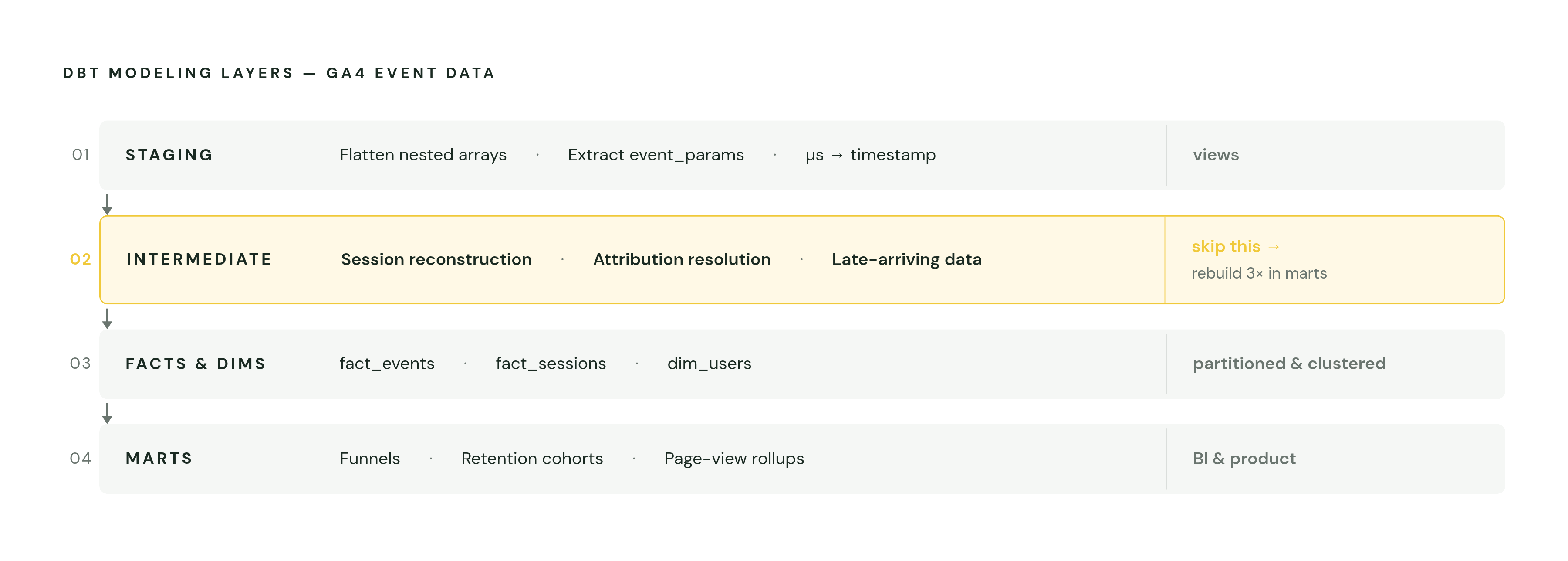
dbt projects use a four-layer structure, with staging, an optional intermediate layer, facts and dimensions, and marts each serving a distinct purpose. Applied to GA4, each layer has one job, and skipping a layer is usually where teams end up rebuilding the same logic three times in three different mart models.
Staging tames the schema. Naming, types, and semantics get standardized, nested structures get flattened, and the common event_params keys get pulled into named columns instead of staying buried in arrays. _TABLE_SUFFIX filtering has to happen here, to avoid the full-shard scan above, and microsecond timestamps get converted into something a person can actually read here too. Staging models should materialize as views: cheap, always current, no redundant storage sitting around unused.
Session reconstruction lives in the intermediate layer, and it belongs there for a reason: building the session key from user_pseudo_id and the extracted ga_session_id needs logic that staging, by design, keeps simple and mechanical. Intermediate is also where the traffic-source ambiguity gets resolved, by picking one canonical source field instead of leaving four competing ones for analysts to guess between. And it's where late-arriving data gets handled. GA4 modifies the previous day's records after they've already landed, so the incremental logic at this layer decides what counts as a "settled" partition before anything gets promoted further downstream.
The fact and dimension layer is the payoff: one row per event in a fact_events table, one row per session in a fact_sessions table, one row per user in a dim_users table. These are the clean, flat tables analysts should actually be querying. Migrating from sharded tables to a properly partitioned materialization pays off here, since partition pruning is what keeps query costs sane once the fact tables get large.
Incremental materialization strategies that keep BigQuery costs in check
Incremental models are what make any of this financially sustainable. Instead of rebuilding an entire table on every run, an incremental model processes only the rows that are new or changed, and at GA4 scale, that difference in query cost is not small.
BigQuery bills on bytes scanned across the columns you select, not on how many rows come back. A SELECT * against a wide event table causes BigQuery to scan every column even when the WHERE clause narrows the result down to a handful of rows. GA4 event tables are wide by nature, dozens of parameter columns per event, which makes that exact mistake unusually expensive to make even once.
dbt gives you three incremental strategies, and picking the wrong one is a real, recurring failure mode, not a stylistic choice. insert_overwrite works cleanly with partitioned tables and skips row-by-row key matching entirely, which makes it the right default for GA4 event data, where partitions map neatly onto calendar days. merge is for situations where existing rows genuinely need updating, which is what GA4's late-arriving modifications to already-landed records require. append skips key matching and overwrites entirely, but it only works for event streams that are truly immutable. Use it on GA4 data, which gets back-modified constantly, and you quietly miss every one of those updates without any error telling you so.
None of that works unless the partition strategy lines up with the incremental filter. insert_overwrite only behaves correctly when the model is partitioned on the same column used in the filter (a date, timestamp, datetime, or int64 field), and the data types have to match exactly. Get that alignment wrong, and dbt rewrites the whole table anyway, quietly erasing the cost savings the incremental strategy was supposed to deliver.
Testing and documentation that make event models trustworthy
GA4 revises yesterday's data after the fact. A model that was correct yesterday can be silently wrong today, with nothing in the output signaling that anything changed. That's exactly the kind of drift automated testing exists to catch before it reaches a dashboard someone is making a real decision from.
dbt's built-in generic tests cover a good deal of this without any custom code. A not_null test on the components of the session key, user_pseudo_id and the extracted ga_session_id, catches gaps upstream in the export itself. A unique test on the composite session key inside fact_sessions confirms the session reconstruction logic in the intermediate layer is actually working, rather than assuming it. An accepted_values test on event_name flags new or renamed events coming out of GA4 before they quietly corrupt a funnel model built assuming a fixed set of event names.
Source freshness checks matter just as much, and skipping them is how a broken pipeline goes unnoticed for weeks. Declaring the GA4 export tables as dbt sources with a freshness block turns a missing day's export into a visible warning. Without it, the gap stays silent because the pipeline breaks quietly, and it appears later as an unexplained dip in a retention chart nobody can explain.
Beyond the generic tests, event data needs custom singular tests written against its own specific invariants. Assert that a session's start timestamp always precedes its end timestamp. Assert that no session key ever appears in both fact_sessions and the intermediate holding zone for late-arriving data at the same time, since that overlap means a session got counted twice.
What the finished pipeline looks like and how analysts consume it
What comes out the other end is a set of clean, partitioned, clustered BigQuery tables (fact_events, fact_sessions, dim_users, and whatever purpose-built marts a given business needs), all produced by a dbt project that's tested and documented. No external event store sits behind it, and no vendor lock-in exists beyond BigQuery itself.
Different people touch this pipeline at different layers, and that's the point of building it this way. Data analysts query the fact and dimension tables directly, either in BigQuery or through a BI tool, since the hard work of unnesting arrays and reconstructing sessions already happened upstream. Product managers and marketers connect a BI tool, or a warehouse-native analytics platform, to the mart layer instead, where funnels, retention cohorts, and page-view rollups sit pre-aggregated and readable without a line of SQL. Data science and ML teams draw from the same clean fact tables to build feature pipelines, skipping a separate data-prep stage entirely because the prep already happened in dbt.
That's where warehouse-native AI analytics tools come in, and here's specifically what they actually do rather than what they claim to do. Platforms like Mitzu connect directly to the mart layer sitting inside BigQuery, recognize common schemas including GA4's and custom event tables, and let someone without SQL skills ask a behavioral question in plain language. A Slack agent or an MCP-compatible interface can answer "what's the activation rate this week?" without an analyst sitting in the middle translating the question into a query by hand. Mitzu's workspace-based pricing keeps compute costs inside the customer's own warehouse rather than routing them through a separate billing layer.
BigQuery itself keeps extending this same pipeline further. Gemini Cloud Assist adds natural-language SQL generation right inside the query editor. The run_bq_command MCP tool lets agents handle job scheduling, job management, and reservation management on their own. Automated metadata enrichment through SQLX configurations keeps documentation attached to the models it describes instead of drifting out of sync in a separate wiki somewhere. None of it requires the data to leave BigQuery at any point. That's the premise the whole architecture was built on, and it's the reason the product manager's Slack question eventually gets answered without a human translating it first.
Methodology & sources
- Best Warehouse-Native AI Analytics Platforms in 2026
Informed the discussion of warehouse-native AI analytics platforms connecting directly to BigQuery mart layers, including Mitzu's schema recognition and workspace-based pricing model.
- https://www.getdbt.com/blog/reduce-bigquery-costs
Informed the cost-management strategies around BigQuery billing on bytes scanned and the importance of partition alignment with incremental filters.
- https://docs.getdbt.com/reference/resource-configs/bigquery-configs
Provided technical detail on BigQuery-specific dbt configurations including partitioning, clustering, and incremental strategy options.
- https://medium.com/decode-data/understanding-the-ga4-bigquery-export-schema-and-structure-3a068ebee4ea
Informed the explanation of GA4's nested REPEATED RECORD schema, typed value columns, and the absence of a native sessions table.
- https://www.owox.com/blog/articles/ga4-bigquery-export-event-table-schema-and-dates
Informed the description of GA4's date-sharded export tables and the use of _TABLE_SUFFIX for efficient partition filtering.
- https://www.digitalapplied.com/blog/ga4-bigquery-export-2026-marketing-analytics-reference
Provided the figure of approximately 10 million events as the threshold at which GA4 Explorations apply sampling.
- https://medium.com/@dmitrijs.gizdevans/profiling-and-flattening-ga4-data-in-bigquery-a-step-by-step-walkthrough-46d7f9e629a5
Informed the walkthrough of flattening GA4's nested event_params arrays into named columns using UNNEST and reusable temp functions.
- https://biztory.com/blog/using-dbt-to-model-ga4-raw-data
Informed the four-layer dbt modeling pattern applied to GA4 data, including session reconstruction and traffic source resolution in the intermediate layer.